> For the complete documentation index, see [llms.txt](https://docs.bunzz.dev/product-docs/llms.txt). Markdown versions of documentation pages are available by appending `.md` to page URLs; this page is available as [Markdown](https://docs.bunzz.dev/product-docs/module/how-to-interact.md).
# How to interact
You can use any libraries to interact with smart contracts deployed from Bunzz.
* [ethers.js](https://docs.ethers.io/v5/)
* [web3.js](https://web3js.readthedocs.io/en/v1.8.1/)
* [wagmi](https://wagmi.sh/)
* [web3.py](https://web3py.readthedocs.io/en/v5/)
* and more...
If you want to interact with a deployed contract directly, you can use the [Interaction UI](/product-docs/module/how-to-interact/interaction-ui.md).
In this tutorial, let's see a simple example of interacting with your smart contract.
{% tabs %}
{% tab title="ethers.js" %}
1\) Install the package to your project
```shell
npm install --save ethers
```
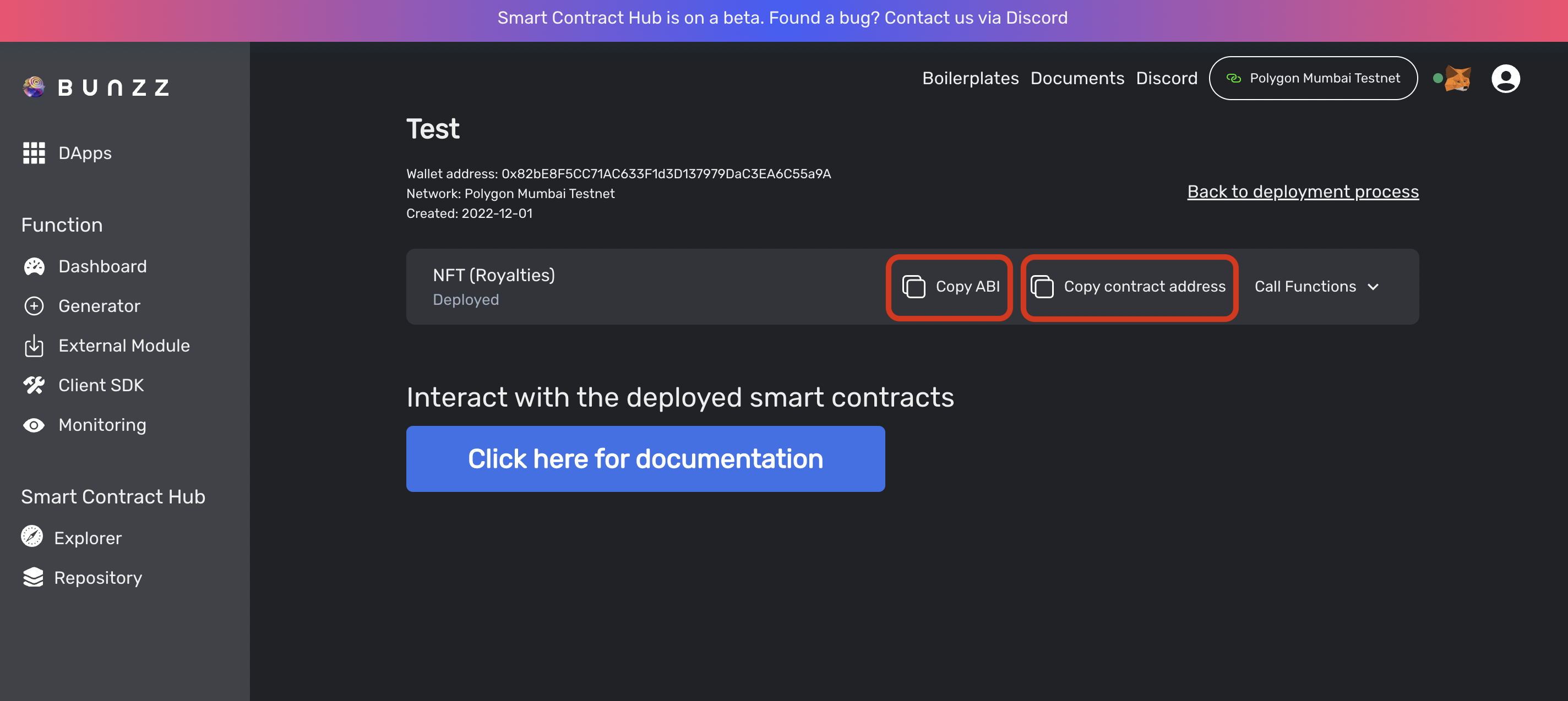
2\) To interact with a deployed smart contract, please copy the contract's address and the ABI from the Bunzz dashboard.
3\) First, you need to create a contract object.
```javascript
const { ethers } = require('ethers');
// Connect to a user's metamask
const provider = new ethers.providers.Web3Provider(window.ethereum);
// Contract ABI (Copy from the Bunzz Interface)
const contractABI = [...];
// Contract address (Copy from the Bunzz Interface)
const contractAddress = '0x...';
// Create a contract instance
const contract = new ethers.Contract(
contractAddress,
contractABI,
provider
);
```
4\) Once you have created an object of the contract, you can call its functions using the `contract.functioName()` syntax. For example, if the contract has a function named `getValue` that returns the value stored in the contract, you can call it like this:
```javascript
const value = await contract.getValue();
```
You can also call a function to update state of the contract that requires signing. For example, if the contract has a function named `setValue`, you can call it like this:
```javascript
const signer = await provider.getSigner();
await contract.connect(signer).setValue(5);
```
Here is the complete code example:
```javascript
const { ethers } = require('ethers');
// Connect to blockchain
const provider = new ethers.providers.Web3Provider(window.ethereum);
// Contract ABI (Copy from the Bunzz Interface)
const contractABI = [...];
// Contract address (Copy from the Bunzz Interface)
const contractAddress = '0x...';
// Create contract instance
const contract = new ethers.Contract(
contractAddress,
contractABI,
provider
);
// Call a read function
const value = await contract.getValue();
// Call a write function
const signer = await provider.getSigner();
await contract.connect(signer).setValue(5);
```
To learn details and advanced usage of ethers.js, read [the official document ](https://docs.ethers.org/v5/)or google "ethers.js" since there are a lot of great articles👍
{% endtab %}
{% tab title="web3.js" %}
1\) Install the package to your project
```shell
npm install --save web3
```
2\) To interact with a deployed smart contract, please copy the contract's address and the ABI from the Bunzz dashboard.
3\) First, you need to create a contract object.
```javascript
const Web3 = require('web3');
// Connect to a user's metamask
const web3 = new Web3(Web3.givenProvider);
// Contract ABI (Copy from the Bunzz Interface)
const contractABI = [{...}];
// Contract address (Copy from the Bunzz Interface)
const contractAddress = '0x...';
// Create a contract instance
const contract = new web3.eth.Contract(contractABI, contractAddress);
```
4\) Once you have created an object of the contract, you can call its functions using the `contract.methods.functioName().call()` syntax. For example, if the contract has a function named `getValue` that returns the value stored in the contract, you can call it like this:
```javascript
const value = await contract.methods.getValue().call();
```
You can also call a function to update state of the contract that requires signing with `send` syntax. For example, if the contract has a function named `setValue`, you can call it like this:
```javascript
await contract.methods.setValue(5).send({from: web3.eth.defaultAccount});
```
Here is the complete code example:
```javascript
const Web3 = require('web3');
// Connect to a user's metamask
const web3 = new Web3(Web3.givenProvider);
// Contract ABI (Copy from the Bunzz Interface)
const contractABI = [{...}];
// Contract address (Copy from the Bunzz Interface)
const contractAddress = '0x...';
// Create a contract instance
const contract = new web3.eth.Contract(contractABI, contractAddress);
// Call a constant function of the smart contract
const value = await contract.methods.getValue().call();
// send a transaction to the smart contract
await contract.methods.setValue(5).send({from: web3.eth.defaultAccount});
```
To learn details and advanced usage of web3.js, read [the official document](https://web3js.readthedocs.io/) or google "web3.js" since there are a lot of great articles👍
{% endtab %}
{% tab title="wagmi" %}
1\) Install the package to your project
```shell
npm install --save wagmi ethers
```
2\) To interact with a deployed smart contract, please copy the contract's address and the ABI from the Bunzz dashboard.
Keep them as variables in your production code.
```javascript
// Contract ABI (Copy from the Bunzz Interface)
const contractABI = [...];
// Contract address (Copy from the Bunzz Interface)
const contractAddress = '0x...';
```
3\) First, you need to wrap your main component with the "WagmiConfig" component.
```javascript
import { WagmiConfig, createClient } from 'wagmi'
import { getDefaultProvider } from 'ethers'
const client = createClient({
autoConnect: true,
provider: getDefaultProvider(),
})
function App() {
return (
)
}
```
4\) Wagmi is a collection of React Hooks to interact with EVM blockchains. Here is a hook to connect user's wallet and your app.
```javascript
const { connect } = useConnect({
connector: new InjectedConnector(),
});
```
You can also call a function via hooks. For example, if the contract has a function named `setValue` as a write function, you can call it by these hooks:
```javascript
const { config } = usePrepareContractWrite({
address: contractAddress,
abi: contractABI,
functionName: 'setValue',
args: [5],
});
const { write } = useContractWrite(config);
```
Here is the complete code example:
```javascript
import {
WagmiConfig,
createClient,
useAccount,
useConnect,
usePrepareContractWrite,
useContractWrite
} from 'wagmi';
import { InjectedConnector } from 'wagmi/connectors/injected';
import { getDefaultProvider } from 'ethers';
const client = createClient({
autoConnect: true,
provider: getDefaultProvider(),
})
// Contract ABI (Copy from the Bunzz Interface)
const contractABI = [...];
// Contract address (Copy from the Bunzz Interface)
const contractAddress = '0x...';
const App = () => {
return (
)
};
const Main = () => {
const { isConnected } = useAccount();
const { connect } = useConnect({
connector: new InjectedConnector(),
});
const { config } = usePrepareContractWrite({
address: contractAddress,
abi: contractABI,
functionName: 'setValue',
args: [5],
});
const { write } = useContractWrite(config);
return (
{isConnected
?
: <>}
);
};
```
To learn details and advanced usages of wagmi, read [the official document ](https://wagmi.sh/)or google "wagmi hook" since there are a lot of great articles👍
{% endtab %}
{% tab title="web3.py" %}
1\) Install the package to your project
```shell
pip install web3
```
2\) To interact with a deployed smart contract, please copy the contract's address and the ABI from the Bunzz dashboard.
3\) First, you need to create a contract object.
```python
from web3 import Web3
# Connect to your EVM node
w3 = Web3(Web3.HTTPProvider('http://'))
# Contract ABI (Copy from the Bunzz Interface)
contract_abi = [{...}]
# Contract address (Copy from the Bunzz Interface)
contract_address = '0x...'
# Connect to the contract
contract = w3.eth.contract(address=contract_address, abi=contract_abi)
```
4\) Once you have created an object of the contract, you can call its functions using the `contract.functions.functioName().call()` syntax. For example, if the contract has a function named `getValue` that returns the value stored in the contract, you can call it like this:
```python
result = contract.functions.getValue().call()
```
You can also call a function to update state of the contract that requires signing with `transact` syntax. For example, if the contract has a function named `setValue`, you can call it like this:
```python
sender = w3.eth.get_accounts()[0]
tx_hash = contract.functions.setValue(5).transact({"from": sender})
```
Here is the complete code example:
```python
from web3 import Web3
# Connect to your EVM node
w3 = Web3(Web3.HTTPProvider('http://'))
# Contract ABI (Copy from the Bunzz Interface)
contract_abi = [{...}]
# Contract address (Copy from the Bunzz Interface)
contract_address = '0x...'
# Connect to the contract
contract = w3.eth.contract(address=contract_address, abi=contract_abi)
# Call a read function
result = contract.functions.getValue().call()
# Call a write function (send a transaction to the contract)
sender = w3.eth.get_accounts()[0]
tx_hash = contract.functions.setValue(5).transact({"from": sender})
```
To learn details and advanced usage of web3.py, read [the official document](https://web3py.readthedocs.io/) or google "web3.py" since there are a lot of great articles👍
{% endtab %}
{% endtabs %}